


After a long break from modding, I finally released a new tool! I managed to recreate the FMOD Designer project file used for Galaxy On Fire 2 (GOF2) as close to the original as I could. The new tool can be found on my GitHub page and is designed to edit GOF2’s .fev file, which means it is now possible to easily and completely modify sound events. It is still far from perfect, as I have still not tested a lot of stuff, so I would appreciate any contributions to making it more and more like the original. With it, you can now add new sound effects and music without having to replace anything. Want to add more explosion sound effects or expand the soundtrack by making the game choose randomly between multiple possible battle tracks? All that is now possible! You can now change the behaviour of complex audio events such as the hangar atmosphere, mining process, engine effects, hangar music effects and much more. I’m very excited to see what mods will be made with this!
If you’re interested in what role the .fev or .fdp files play, how I recreated the FMOD Designer project to be able to generate custom ones or what problems I ran into while doing so, all of that will be explained in this post.
Index
- The Problem with adding anything to GOF2
- How GOF2 handles sound
- Modifying the FMOD implementation
- Recreating the FMOD project
- Problem I ran into
The Problem with adding anything to GOF2
Adding anything to Galaxy On Fire is either a really annoying chore or impossible (at the moment at least). You can’t add new ships, you have to replace them. You can’t add new Items, you have to replace them. You can’t add new textures, you have to replace them. So far the only instance I’ve seen of someone successfully adding something to the game was Ravernstal and KiritoJPK figuring out how to add planets and systems on android (using reverse engineering).
When it comes to sound, you can’t add new sounds either, you have to replace them.
However, I’ve figured out a way to remove that barrier.
How GOF2 handles sounds
GOF2 uses the FMOD sound engine, which is used to implement complex audio events without the need of programming or code. In the game’s files there is a folder called “sound” which holds one “FMOD_GOF2.fev” file and around 14 files with the extension “.fsb”.

The FMOD sound bank files (.fsb) are the place where the actual waveforms/audio files for the game’s sound effects and music are stored. The FMOD event file (.fev) tells the game how to handle specific events. For example: When a player shoots with the Nirai Impulse EX1 laser, the game triggers the “Laser_Nirai_Impulse_EX1” event, which causes the sound effect of the laser to play once. When a player enters a battle with only a few enemies, the event “Space_Combat_Low” is triggered, which plays the low intensity battle theme in a loop until the battle is finished.
Events can be way more complex than just playing a single sound effect or looping a piece of music. When a player is drilling an asteroid, the main event being played is the “Mining_Drill” event. This event consists of a loop of a drill, with additional sound effects added the further the player gets in the drilling process.
Modifying the FMOD implementation
Modifying the sound bank files has been possible for a very long time. Programs such as Aezay’s “FSBExtractor” or gdawgs “fbsext” do a really good job of extracting the sound files from sound banks. SLJar showed the Kaamo Club (KC) Discord server’s modding community how to reassemble those sound bank files, using the fsbank.exe program from the FMOD API, which only works with the game’s .mp3 encoding. NotFounded then showed us how to reassemble the IMA ADPCM or .wav encoded sound banks using FMOD Designer, a program which will play a big role later on. Using those tools it was quite easy to change the in-game sound files. You would just extract the sound files from the .fsb file you were intending to modify, replace the sound you wanted to change and then reassemble it. I used those methods to make the satirical “Galaxy on Fire 2: Google Translate Edition” mod, in which I had to replace the story’s voice lines.
So replacing the sounds is really easy, but how do you edit the actual events that trigger them? Doing that would require having the original FMOD Designer project file (.fdp) that Fishlabs used to build the .fev file (the file that holds all the information for the events).
Obviously we don’t have that file. However, there’s another program included in FMOD Designer that can be used to open up the .fev file. Opening the .fev in FMOD Event Player reveals a whole ton of information about the sound events. Even the folder structure of the event file is visible.
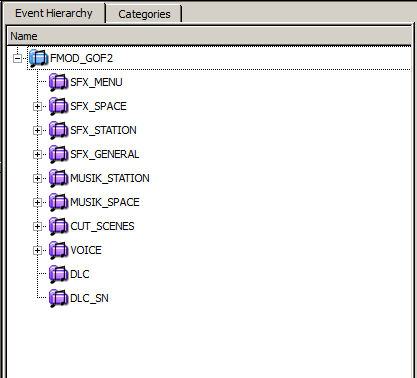
With all this information it’s possible to recreate the FMOD project that was used to create the .fev file with high accuracy. Then all kinds of changes and modifications can be made. which can then — in theory — be implemented in-game by building a new .fev file.
After seeing how much detail is shown in the Event Player, I googled around a bit to see if what I would be attempting to do had been done in any other game before. It appears that the modding community of the Souls games had essentially the same problem. The modder HotPocketRemix then went out of his way to recreate the original FMOD sound projects.
Seeing that it should almost definitely be possible, I spent at least a few hours in FMOD Sound Designer.
Recreating the FMOD project
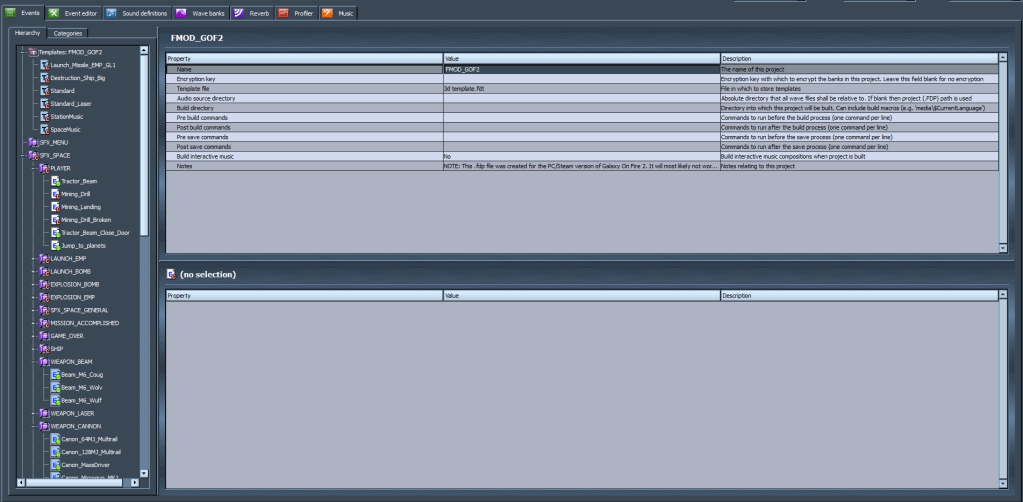
My approach was very different to the way HotPocketRemix handled it with Dark Souls. That game apparently uses a ton of .fdp files, meanwhile GOF2 only uses one. He wrote python scripts that automated that process, however they obviously don’t work with GOF2. I don’t know how far those python scripts go in the process of recreating the .fdp files and my programming knowledge is still a bit too limited to understand the code in there. Dark Souls uses multiple .fdp files while GOF2 only used one. The .fev file isn’t really complex, so I chose to recreate it in FMOD Designer myself.
Recreating the project file was fairly easy, especially because of what’s visible in the event player. However, there are some aspects which I had to use my ears to replicate. First of all, what the actual sound effects are used for in an event is nowhere to be seen in the Event player. But that can be easily overcome by looking which sound bank is accessed by the event, for example, the bank for all voice lines used in the space lounges. Sure, you have to listen closely in some cases to find out which sound is used, but it’s not that big of a hassle, especially if you know most sounds in the game fairly well.
While trying to figure out more complex aspects of the .fev file, I’ve made some very cool discoveries that I want to share.
Parameters
To tackle complex events, FMOD uses “parameters”. These parameters are basically just values which can be controlled by the game. These values can then affect a lot of different aspects of an event. They can affect which sounds are played or what effects are being applied and the settings of those effects.
I already mentioned the Mining_Drill event earlier in this article and that event is a great example of how parameters work. The event has one parameter, called “drill_speed” with possible values of anything between 0.0 to 2.0. That parameter is controlled by the drilling progress of the player.
The Mining_Drill_Slow_1.wav sound file loops until the event is cancelled, meaning the player finished mining the asteroid. When the player goes deeper into the asteroid, the parameter is given the value of 1.0, which causes the Mining_Drill_Switch.wav to be played once (also called a Oneshot sound, instead of a looping sound) and an additional Drill sound (Mining_Drill_Add_1.wav) to be added. At a parameter value of 1.5 that sound gets pitched up and eventually replaced by Mining_Drill_Add_2.wav at the parameter value of 2.0.

- Here’s a video of me playing Mining_Drill inside FMOD Event Player, sliding the parameter around
- Here’s how I replicated that event and it’s parameter in FMOD Designer
I struggled to figure out parameters at first, but eventually got the hang of it. Other uses of parameters I had to figure out were in the player’s engine sounds , “atmospheric” sound effects and the station music. The player’s engine has 3 parameters:
- “Vertical”: Controlled by the players speed (which can be changed using the mouse wheel), affects pitch
- “Horizontal”: Controlled by strafing the ship, affects panning
- “load”: Controlled by the players used cargo hold, affects volume
I never knew that the cargo hold could affect the volume of the engine, so that was pretty cool to find out. The “Horizontal” parameter caused was sort of an issue, because strafing isn’t really a thing in the PC version of the game. Because I can’t strafe like in any of the other game versions, I can’t really know if i replicated it correctly.
“Atmospheric” events only have one parameter, called “loop”. The loop parameter has an acceleration, meaning that it’s always increasing, going back down to 0 once the maximum value has been reached. When a player enters any stations hangar, an event called “Station_Atmo_Hangar” is triggered. The “loop” parameter starts doing it’s thing, which is, obviously, looping. Scattered throughout these loops are so called “sound definitions”, which are basically folders of sound effects. Those sound definitions can be set to either play sequentially (like a music playlist) or randomly when triggered. In the case of the hangar‘s atmosphere, that settings is set to random.
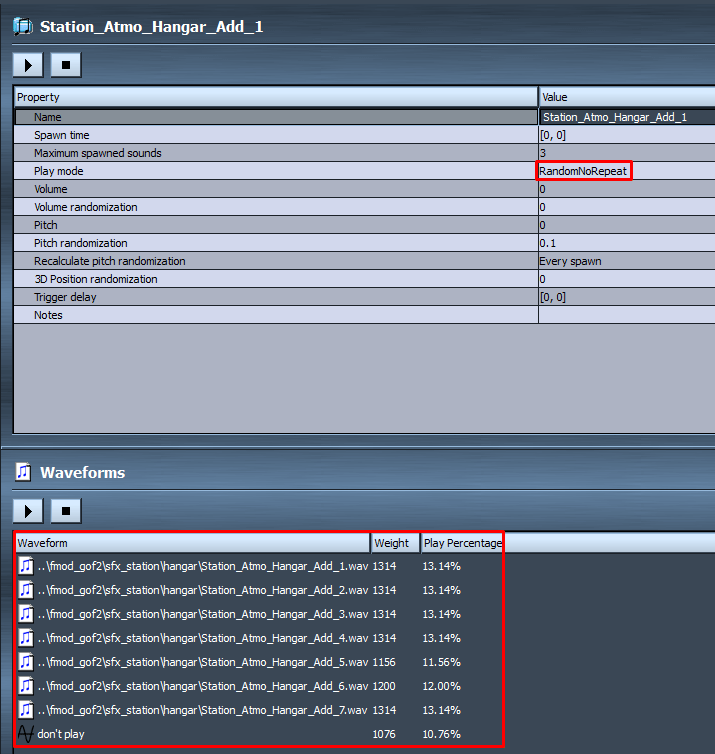
After listening to the event a lot, I figured out how those random sounds are scattered throughout the event. Placed on top of all that is one atmospheric sound effect, which loops and always stays the same.

Here is the looping “main” sound:
Here are some of the possible additional sound effects:
And here’s the event when played inside FMOD Designer:
As I already mentioned, the music played when visiting a station also has a parameter. That parameter is called location. It controls multiple effects. When in the main hangar view, the parameter has a value of 0, no effects are being applied. When switching over to the space lounge, the event parameter is set to 1 and a low pass filter and echo are applied. When going to the map, “location” is set to 2, which turns on a high pass filter and and echo.
Reverb
When opening the .fev file in FMOD Event Player, you can apply two reverb settings. One called “Hangar” and one called “Cockpit”. When these are applied in-game is self explanatory.
Recreating the reverb was not a problem at all, as the event player shows all the information necessary

The amount of reverb can be set for every event. For example, having the reverb dry and wet mix turned all the way up (which is the default setting) for voice lines sounds silly. Here it sounds like Keith and Snocom are shouting at each other from two different ends of the station.
I had to play around a bit with the reverb value for a while until I eventually found a mix that sounds good.
Problems I ran into
Sadly, this project wasn’t all sunshine and rainbows. There are still some issues that I haven’t been able to fix yet or don’t know if I’ve fixed them correctly.
User properties
When playing some events in FMOD event player, a value called “User properties” appears. All these user properties are Integers. Sometimes they’re 0, sometimes they’re at 1000, 1500, 2000 or 3000. If an event has a user property, the name is always “0”, which doesn’t give you any information about it’s purpose. I added those user properties to every event which uses them, but I have no idea what their use is. Maybe someone else can figure it out.
DLC content
Galaxy on Fire 2 has two DLCs/expansions, Valkyrie and Supernova. While they’re available for iOS, macOS and Android, they’ve never been released for PC. However, multiple traces of those two DLCs can be found inside the game files. So it can be assumed that DLC content was once actually in development for PC, but cancelled. These traces eventually allowed 4pda modders SL-Jar and Cyrax-X to make the Valkyrie patch, which enables Valkyrie for PC. The story expansion of Valkyrie isn’t included in this patch, only the items, systems and stations.
Some DLC traces can be found in the .fev file as well. They don’t work, because the soundbanks are missing, so they are basically “dead” events. I didn’t bother implementing those, because they don’t work unless you have the DLC sound banks, but I will probably do just that in the future, even though it’s not of that much use.
3D Rolloff
All 3D events have a volume “Rolloff”, meaning they get quieter when further away and louder when closer to the player. There are 3 settings for the rolloff: The rolloff model, maximum and minimum.
For the model I chose “linear”, because “logarithmic” wouldn’t work in GOF2. For most sounds i set the minimum to 3.000 and maximum to 30.000 units. As a result a sound played closer than 3000 units away is played at maximum volume and a sound farther than 30.000 units away is played at minimum volume. For explosions those values are a bit closer together and I’ve also changed them for other events. I still have some events such as the wormhole which I haven’t tested and will probably have to adjust the minimum and maximum barriers a bit.
FMOD’s character limit
When FMOD sound banks are built, the file names inside them are shortened if they are longer than 30 characters. This leads to a lot of cutoff names when the files are extracted, especially for the sounds of lounge interactions. For example, the lines for different species offering you blueprints can end in “BLUEP”, “BLUEPRINT” or just “B”. It all depends on the name of the species. The Terran female lines don’t even have the actual interaction in their name. Instead they are just numbered from 0 to 44. The files of the other species, with interaction names included in them, are also numbered, but those numbers are off by 1 because of the character limit. I originally fixed this by renaming them. I then decided to abstain from releasing the sound files along with the finished project file and instead wrote two scripts which would sort the sound files the user extracted themselves. However, I forgot I renamed my sound files. So I had to re-extract them and then type all the original file names into FMOD Designer by hand…
Because of these strange character limits, I first paused the implementation of localisation. As you can probably guess, the German voice lines are cutoff differently from their English counterparts. Also somehow GOF2 uses different sound banks for the German version, of which I can’t find any mention of in the FMOD Designer manual. I’ll have to figure that out some other time.
Fishlabs also really enjoyed choosing strange names, placing files in strange places, or causing other anomalies. Over 20 of the lounge files can be found in the sound bank for the main storyline, the word “cannon” is always spelled like the camera manufacturer, German nouns for the species are used in the music files and the Oppressor bomb has two sounds which sound exactly the same. These are only a few of the weird aspects of the sound names. Luckily they’re not more than a slight annoyance.
Thank you for reading this article! If you’re interested in checking out or helping me with this project, be sure to take a peek at it on my GitHub page.
 Kroete's Blog